
Community Alpha · v0.1.0-alpha.1
Your Playwright project.
One local command center.
Local-first TestOps for Playwright automation, by Elixir Nexus. Watcher installs into the Playwright project you already have: plan a run, watch it live, and come back to the results later — without changing your config or sending anything off your machine.
npm install --save-dev @elixir-nexus/watcher@alphanpx watcher startNot yet published to npm. These commands work once the Community Alpha is released.
Product preview

Features
Everything around the run, nothing in your way
Watcher handles the operational side of a Playwright project while Playwright keeps doing the testing.
Plan before you run
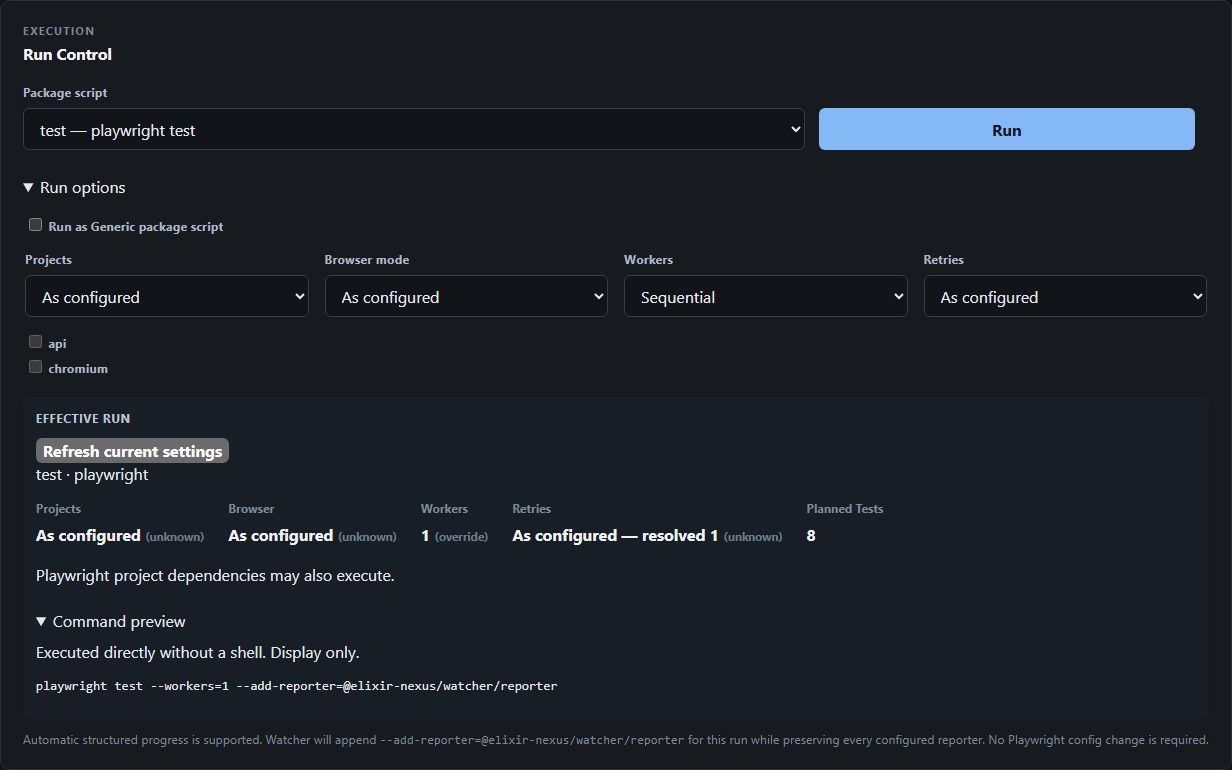
Pick a package script, then override projects, workers, retries or headed mode. See where each setting comes from, how many tests Playwright will run, and the exact command.
Learn more about Plan before you runWatch runs live
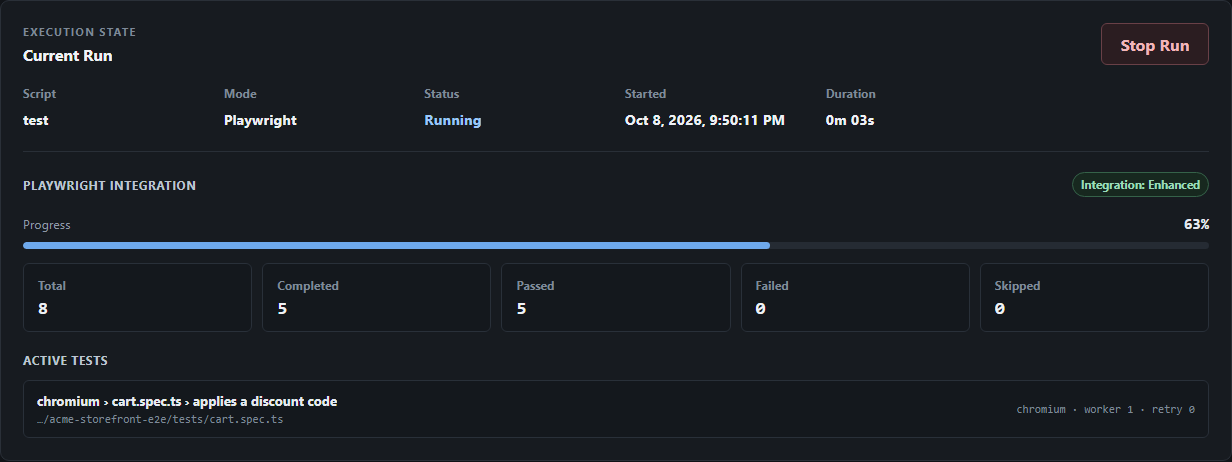
Follow progress counters, the tests running on each worker, and ordered console output as they happen. Stop the whole process tree with one click.
Learn more about Watch runs liveKeep a local run history
Every passed, failed and stopped run is saved to a SQLite file in your project, with the final result of each test, failed tests first.
Learn more about Keep a local run historyRepeat a run
Bring back a past run’s script and options in one step. Watcher tells you when the script, its mode or your Playwright version changed since then.
Learn more about Repeat a runFind reports and artifacts
See where each run’s HTML, JSON, JUnit, Blob and Allure outputs and test attachments went, and whether they are still there now.
Learn more about Find reports and artifactsYour project stays yours
No config edits, no script rewrites, no telemetry. The dashboard listens only on 127.0.0.1, and Playwright keeps working exactly as before without Watcher.
Learn more about Your project stays yours
How it works
From install to history in four steps
Install in your project
Add Watcher as a dev dependency of the Playwright project you already have.
npm install --save-dev @elixir-nexus/watcher@alphaStart the dashboard
Watcher discovers your scripts, config and tests, then serves a local dashboard.
npx watcher startPlan and run
Choose a script, adjust options, and run. On Playwright 1.63+ Watcher appends its reporter with --add-reporter, alongside yours.
Review and repeat
Completed runs land in local history. Open one to see each test’s result, then repeat it when you need to.
Works with your setup
Built on Playwright, not around it
Watcher uses your project-local Playwright CLI and your existing configuration. Your reporters keep running — Watcher adds its own alongside them only for runs it starts.
Playwright
- 1.63+
- Enhanced: live progress, active tests, per-test history
- 1.62 and older
- Basic: planned test count, logs, status, Stop Run
- Any script
- Generic: runs through npm with logs and status
Reporter outputs recognized
- HTML
- JSON
- JUnit
- Blob
- Allure results
- Custom reporters
Runtime
- Node.js
^22.13.0 || >=24.0.0- Package manager
- npm
- Platforms
- Windows 11 x64 (primary), Linux x64 (experimental)
Details and verified versions: Platform support.
Current scope
Experimental
Playwright Tools (Codegen and UI Mode) and Linux x64 support.
Not included in this release
Scheduled or recurring runs · More than one managed run at a time · Distributed or sharded execution across machines · Environment management · Historical trends and analytics · AI-assisted features · Frameworks other than Playwright · Team accounts, permissions or shared history · Docker images or hosted deployment · An in-dashboard HTML report viewer.
Start with the docs
Short, task-focused guides written against the actual product.
- Quickstart Your first run in a few minutes.
- Script compatibility Which scripts get Playwright-aware runs.
- Platform support Windows, Linux, Node and Playwright versions.
- Troubleshooting Fixes for common problems.
Questions or feedback? Join the Elixir Nexus Discord.