Run history
Purpose: review completed runs and understand what Watcher keeps about them.
Watcher saves every completed run, whether passed, failed or stopped, to a local SQLite database at:
<project root>/.watcher/watcher.db
Watcher creates the directory automatically on its first valid start. Nothing is uploaded. Add .watcher/ to your Git ignore rules; Watcher does not edit .gitignore for you.
Recent Runs
Recent Runs lists the ten most recent completed runs, newest first, with status, script, duration, completion time and test counts. Select Refresh history to reload the list; it also refreshes automatically when a run completes.
After a run ends, the panel may briefly show Saving N run(s)… Refreshing automatically. while the record is written.
Run Detail
Select a script name in Recent Runs to open Run Detail inline. Opening it does not interrupt a live run or its output.
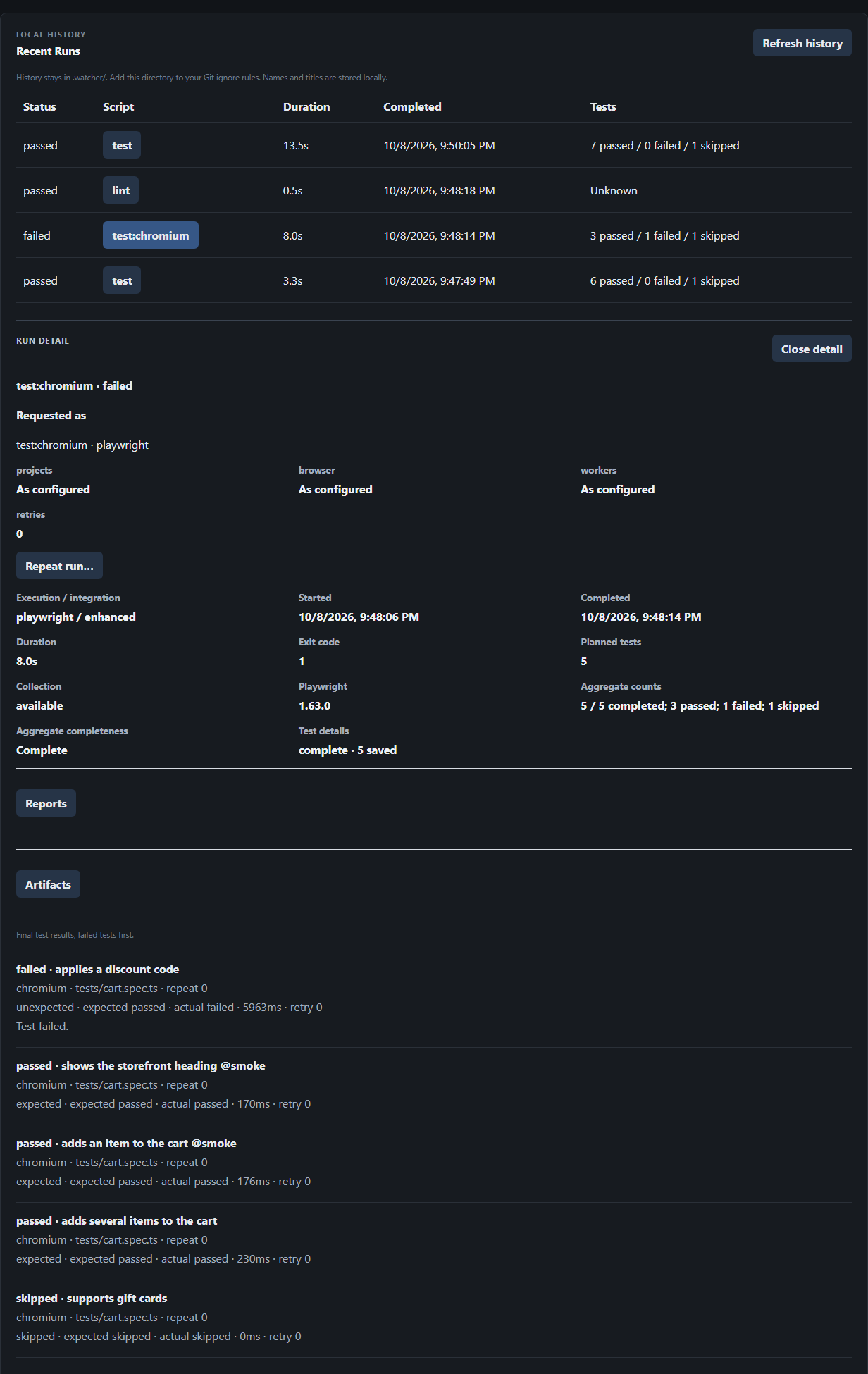
Run Detail shows:
- Requested as: the script, execution mode and Run options the run was started with, and Repeat run… (see Repeat Run).
- Execution / integration, Started, Completed, Duration, Exit code, Planned tests, Collection status and the Playwright version.
- Aggregate counts and Aggregate completeness.
- Test details: whether per-test results are complete, partial or unavailable, and how many were saved.
- Reports and Artifacts: expandable sections described in Reports and artifacts.
- The final result of each test, failed tests first, 100 per page. Use Next test page and First test page to move through large runs.
Reading completeness
Counts and per-test details are tracked separately:
- Basic and Generic runs have no structured events, so their counts show as unknown and no per-test results are stored.
- A stopped or interrupted run can have partial details, including none.
- A failed run can still contain only passed tests, for example when Playwright's
--fail-on-flaky-testspolicy applies or a setup step failed.
What history stores
| Stored | Not stored |
|---|---|
| Run metadata: script, mode, status, times, exit code, Playwright version | Console logs |
| The run recipe: script and Run options | Raw error messages and stack traces |
| Final result of each test | Environment variables or commands |
| References to reports and artifacts | Report or artifact contents |
| Codegen output or Playwright Tools sessions |
File paths are stored relative to the project. Test names and titles are stored as written, so avoid putting secrets in test titles.
When history is unavailable
History is optional to running tests. If storage fails, runs still execute and report their live results; the dashboard and terminal explain the problem. Watcher never deletes or resets an existing database it cannot read.
To start over with empty history:
- Stop Watcher.
- Move or rename
.watcher/watcher.db. - Start Watcher again.
If you see the history problem after downgrading Watcher, upgrade again instead; older versions cannot read newer databases. See Troubleshooting.
Retention
Watcher does not delete old runs automatically in the Alpha, and has no export or backup feature. To remove all history, stop Watcher and delete .watcher/.