Planning a run
Purpose: choose what to run and with which settings, and confirm the effective result before you start.
Prerequisites: Watcher is running, and your project has at least one package script.
Every run in Watcher starts from one of your package.json scripts. Watcher never runs arbitrary shell commands you type into the dashboard.
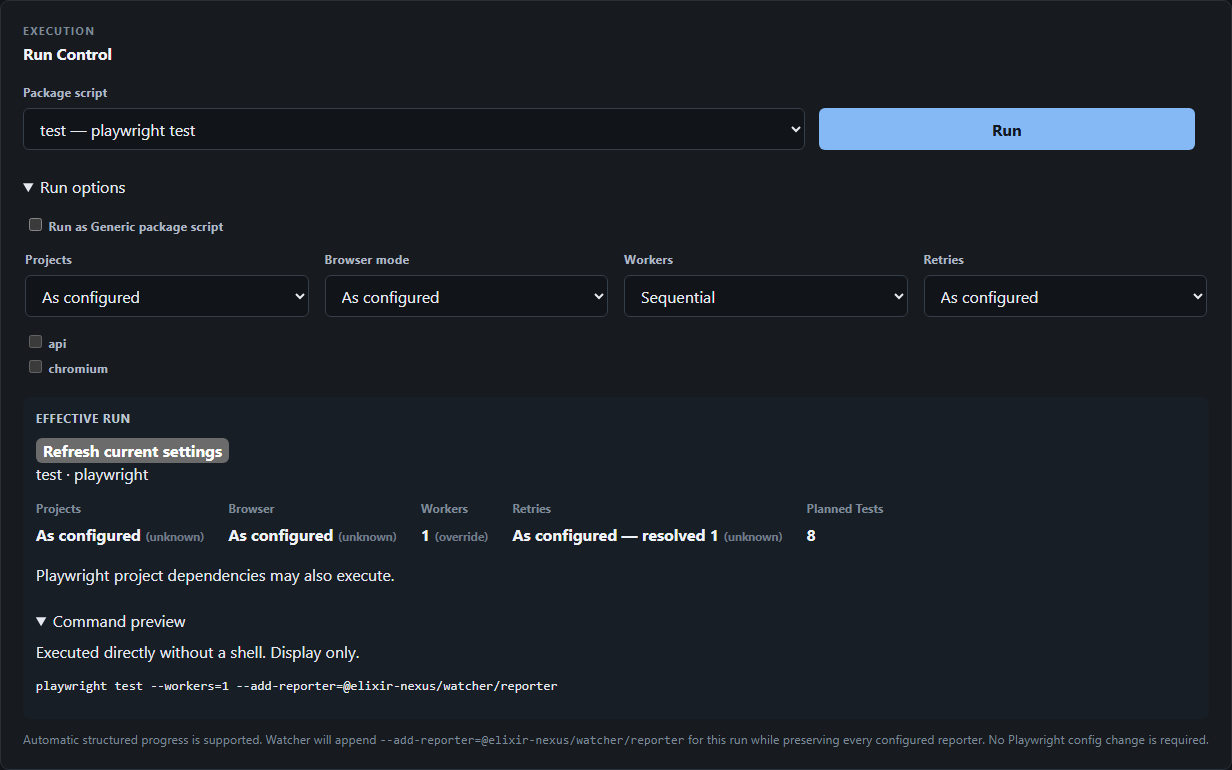
1. Choose a package script
Select a script in Package script. Each entry shows the script name and its command, for example test — playwright test.
Watcher classifies each script when it starts:
- Playwright-aware scripts are straightforward
playwright testornpx playwright testinvocations. They support Run options and structured progress. - Generic scripts are everything else. They run exactly as
npm run <script>would, without Run options.
See Script compatibility for the exact rules and the reasons Watcher shows.
2. Adjust Run options (optional)
Expand Run options. Overrides apply only to Playwright-aware scripts.
| Option | Choices | Effect |
|---|---|---|
| Run as Generic package script | On / off | Run the script through npm in Generic mode instead. Disables the other options. |
| Projects | As configured, or Select exact projects | Run only the checked Playwright projects (up to 32). Projects that cannot be selected exactly, such as duplicate names, are shown with a reason. |
| Browser mode | As configured, Force headed | Run browsers headed. If the script already passes --headed, the planner shows Pinned by script: Headed. |
| Workers | As configured, Sequential, Custom | Sequential uses one worker. Custom accepts 1–64. |
| Retries | As configured, Custom | Custom accepts 0–10. |
When an option cannot be applied to the selected script, its control is disabled and the planner explains why.
How overrides combine with your script
An override replaces the corresponding option in your script rather than adding a second copy. For example, if your script is playwright test --workers=4 and you choose Sequential, the run uses --workers=1 only. Other script options, such as --grep, are kept.
Runs always use the script's own test selection. In the Alpha you cannot target individual files or tests from the dashboard; create a package script for a selection you run often.
3. Review the Effective run
Effective run shows the settings that will apply, each with its source:
| Source | Meaning |
|---|---|
override | Set by you in Run options. |
script | Set by an option in the package script. |
unknown | Not set by an override or the script, so Playwright applies your config. Where Watcher resolved a number from the config, it is shown as As configured — resolved N. |
Values resolved from the Playwright config are labeled unknown, not with a separate config source.
Planned Tests is the number of tests Playwright collected for this plan using the project-local Playwright CLI. When Playwright projects have dependencies, the summary notes that Playwright project dependencies may also execute.
Expand Command preview to see the command. For Playwright-aware scripts, Watcher runs the project-local Playwright CLI directly, without a shell; the preview is for display only.
playwright test --workers=1 --add-reporter=@elixir-nexus/watcher/reporter
If you changed files since the plan was calculated, select Refresh current settings.
4. Run
Select Run. Watcher revalidates the plan against the current project before starting. If the script was removed or changed in a way that invalidates the plan, the run is refused with a reason.
Only one managed run can be active at a time. While a run is active, Run is disabled.
Expected result: the Current Run panel switches to Running. Continue with Watching a run.